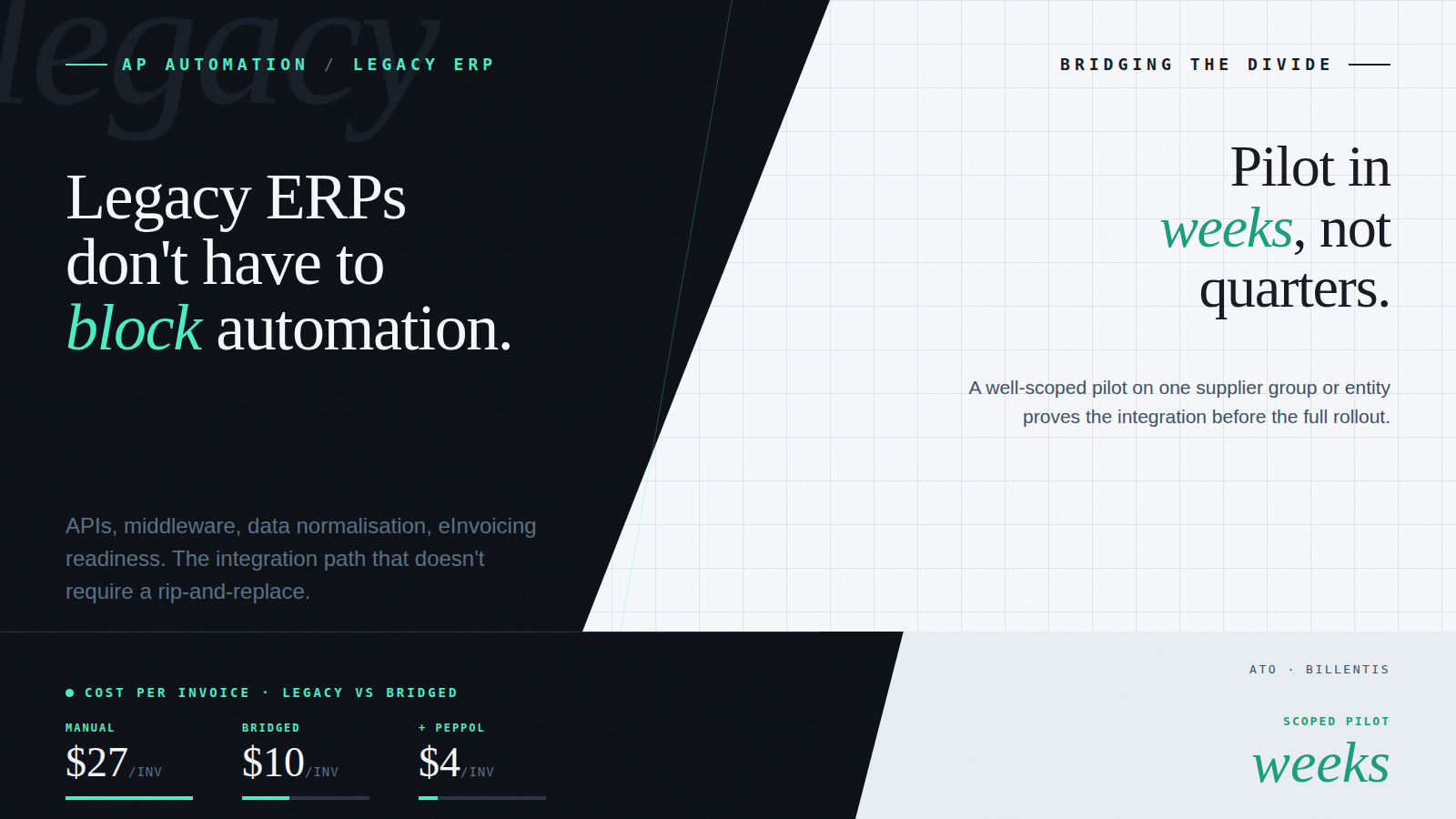
Most AP automation projects stall not because the software fails, but because the system it needs to talk to wasn’t built to listen.
That’s the reality for a large proportion of ANZ mid-market businesses. The finance team wants modern, touchless AP. But… there’s a legacy ERP sitting behind everything – stable, familiar, and completely resistant to real-time data exchange.
The legacy divide is the gap between the AP automation a business needs and what its existing finance systems can support natively. For most ANZ mid-market businesses, it’s the primary reason AP transformation stalls – not a lack of will, and not a failure of the automation software itself.
Replacing the core system isn’t realistic on a mid-market budget or timeline. And standing still isn’t an option: continuing with manual AP processes only carries inefficiency forward year after year, while compliance requirements, including Australia’s expanding eInvoicing mandate, add new layers of complexity on top of an already difficult integration environment.
For financial controllers and AP managers dealing with this day-to-day, the good news is that the legacy divide is bridgeable, without waiting for an ERP replacement project that may never come.
Why Legacy Systems Still Dominate
If older finance systems are holding businesses back, why haven’t more replaced them? The answer is more nuanced than it looks.
- Replacement is expensive and slow. A full ERP migration typically runs into significant cost and years of disruption, a hard sell for any mid-market CFO with competing priorities.
- Customisation makes systems sticky. Over time, businesses tailor their systems to fit unique approval hierarchies, GL structures, and supplier workflows. Those customisations don’t migrate cleanly.
- Risk appetite is low. Finance leaders prefer incremental improvements to wholesale change. Adding capability around an existing system feels safer than replacing the system itself.
- “If it isn’t broken” thinking. Legacy systems may lack modern features, but they’re stable, familiar, and reliable. That counts for a lot when the alternative is months of disruption.
In short, the ERP isn’t going anywhere soon. But standing still isn’t viable either. The question isn’t whether to automate, it’s how to make automation work with the systems that already exist.
The Real Integration Challenge
Legacy and partially configured finance systems create several specific hurdles for AP automation:
- Rigid data structures. Older systems often have closed schemas that don’t align with modern AP outputs. Supplier IDs, GL codes, and tax treatments all need to be mapped before data can flow reliably.
- Limited connectivity. Many systems lack APIs altogether, relying on flat file imports or nightly batch jobs.
- High IT dependency. Any integration typically requires custom development from internal IT or external consultants, which adds cost, time, and ongoing maintenance burden.
- Shadow systems and workarounds. Without proper integration, finance teams resort to spreadsheets, duplicate data entry, and bolt-on tools that undermine data integrity and create compliance risk.
There’s also a newer challenge that’s catching many ANZ businesses off guard: eInvoicing. Australia’s eInvoicing mandate, built on the Peppol network, is expanding toward compliance deadlines in 2026. Government suppliers are already in scope; broader B2B transactions are next. eInvoicing replaces PDF invoices with structured data exchanged directly between accounting systems, and most legacy ERPs weren’t built to receive it.
The result, for businesses that haven’t addressed this, is a patchwork environment where automation either stalls or creates as many headaches as it solves.
Modern Integration Approaches
Technology has evolved to meet these challenges. At Acume, the integrations we build most often for ANZ mid-market clients – typically businesses with 10 to 50 staff running Xero, MYOB, or more on a mid-market to enterprise ERP draw on a small set of proven approaches depending on what the underlying system can support.
1. APIs Where They Exist
Even some older systems have been retrofitted with partial API capability. When available, APIs are the preferred route: they enable near real-time data exchange, reduce reliance on flat files, and support the kind of status-syncing that keeps AP teams working off a single source of truth. The caveat: what the API documentation says a system supports and what it actually supports in a heavily customised environment are often different.
2. Middleware and Integration Layers
When APIs aren’t available or aren’t sufficient, middleware serves as the translator. Integration platforms and pre-built ERP connectors map AP outputs into the formats the legacy system expects, without requiring custom development from scratch.
This approach also scales across multi-entity environments, a common scenario for ANZ businesses that have grown through acquisition and are running multiple finance systems in parallel.
3. Data Normalisation
Legacy systems often handle suppliers, GL codes, tax treatments, and currencies in ways that conflict with how modern AP platforms structure data. Without normalisation, errors multiply as data flows in from AP.
A data normalisation layer ensures that supplier IDs, GST codes, and accounting structures align before transactions reach the ERP. This is unglamorous work, but it’s the difference between an integration that runs reliably and one that generates reconciliation exceptions every week.
4. Hybrid Batch and Real-Time Models
Some systems simply can’t handle real-time posting. In those cases, hybrid models work well: real-time integration for critical workflows like approvals and exception handling, with batch uploads handling bulk data at scheduled intervals.
This lets finance teams benefit from faster processing without overwhelming older systems, and it’s often the right approach for businesses transitioning incrementally rather than all at once.
Making Integration Stick: What We See Work
Technology is only half the equation. The integration projects that succeed in the long run are the ones supported by clear process thinking from the start. Based on what we see with ANZ clients, a few practices make a material difference:
- Map processes before building integrations. Automating a broken process just embeds the problem at a higher speed. Identifying bottlenecks and fixing upstream purchasing discipline before integration work begins pays dividends immediately.
- Engage IT and Finance from day one. Integration isn’t just a technical task – it changes workflows and responsibilities. Finance teams involved in scoping decisions build better-configured systems.
- Pilot with a controlled scope. Start with one supplier group, one entity, or one invoice type. Learn before scaling. The patterns that emerge in a pilot almost always reshape the broader rollout.
- Build for auditability. Every automated posting should leave a clear audit trail. An integration design that shortcuts compliance controls creates risk that surfaces at the worst possible time.
- Plan for ongoing support. Legacy systems don’t stand still – they get patches, upgrades, and further customisation. Integrations need clear ownership and a maintenance plan, not just a go-live date.
The Strategic Payoff
Bridging the legacy divide isn’t just about saving time. Done well, it delivers measurable outcomes across the business:
- Faster invoice cycles. Approvals and postings happen without waiting for manual entry or nightly batch runs.
- Reduced processing cost. The ATO benchmarks paper invoice processing at around $30 per invoice and PDF invoicing at around $27. Automated AP, combined with eInvoicing, reduces that to under $10 per invoice.
- Fewer errors. Data flows directly from the AP platform to the ERP, eliminating rekeying mistakes and the reconciliation effort they generate.
- Better spend visibility. Normalised, structured data gives financial controllers a clearer, more timely view of what’s been committed and what’s been paid.
- Deferred ERP replacement. Well-designed integration extends the productive life of existing systems, often by years, while delivering modern automation capability on top of them.
- eInvoicing compliance readiness. Businesses that build Peppol-capable integration now are positioned ahead of 2026 mandate deadlines, rather than scrambling to retrofit compliance under pressure.
The broader payoff is also strategic: integration transforms how finance interacts with suppliers, auditors, and executives. When the data is clean, timely, and structured, AP stops being a back-office cost centre and starts being a source of genuine business intelligence.
How Acume Approaches Legacy Integration
At Acume, legacy integration is not a fringe use case; it’s the norm. Most of the ANZ mid-market businesses we work with are accounting systems that have been customised significantly from their original install, or have an older ERP sitting behind their accounting platform that requires middleware to bridge.
Across the integrations we’ve built, the failure modes are consistent:
- Data mapping gets underestimated. Supplier master data, GL hierarchies, and tax code structures are treated as a quick config task rather than a foundational design decision – and they cause problems at scale.
- eInvoicing readiness is left too late. Businesses focus on automating what’s already arriving and don’t build Peppol-capable pathways until the mandate forces the issue.
- Audit trails are an afterthought. Integrations are designed for throughput, not compliance, which creates risk when the auditor or the ATO comes calling.
Our approach addresses these from the ground up. Business rules governing how invoices are coded, matched, and posted are configured out of the box, built on AP best practices, and ready to go without custom development for each client. Competitors often build rules from scratch for each engagement; Acume starts from a proven baseline and adjusts to each entity’s structure.
Acume also supports both PDF and eInvoice formats natively, which means clients don’t have to choose between eInvoicing compliance and their existing AP workflows. As the Peppol mandate expands, that dual-format capability becomes increasingly important for businesses receiving invoices from a mix of registered and non-registered suppliers.
The outcome: clients can unlock automation benefits now, without waiting for an ERP replacement that may still be years away.
Conclusion: Legacy Shouldn’t Mean Lagging
Legacy systems aren’t going away. But that doesn’t mean financial controllers and AP managers are stuck with manual, error-prone AP processes while they wait for a modernisation budget that never quite arrives.
By using APIs where they exist, middleware where they don’t, and data normalisation throughout, ANZ businesses can bring modern AP automation into even the most rigid ERP environments. Add in eInvoicing readiness for the Peppol mandate now expanding toward 2026, and the result is a finance operation that’s both efficient and compliant, without a rip-and-replace project.
The technology exists to bridge the divide. The question is whether you’re building the integration with the foundations, clean data, structured rules, and audit-first design, that will make it last.
Ready to Bridge the Gap?
Acume works with ANZ mid-market businesses to build AP automation that works with the systems they already have, including Abel, Costar, Autoline, Orion, Xero, MYOB, and legacy ERPs with limited API support. If you’re dealing with integration complexity that’s stalling your automation progress, we’d love to help.
Contact us to talk through your integration challenges with our team.
Frequently Asked Questions
What is the legacy divide in AP automation?
The legacy divide is the gap between the AP automation a business needs and what its existing finance systems – older ERPs, heavily customised Xero or MYOB environments – can support natively. It’s the primary reason AP transformation stalls in ANZ mid-market businesses, and it’s addressable through APIs, middleware, and data normalisation without replacing the core system.
Can AP automation work with legacy ERP systems?
Yes, but it requires the right integration approach. APIs, middleware layers, data normalisation, and hybrid batch/real-time models can all be used to connect modern AP automation platforms to older finance systems. The key is understanding what each system can actually support, not just what its documentation claims.
How does eInvoicing compliance affect legacy ERP integration?
Australia’s eInvoicing mandate, built on the Peppol network, requires that businesses can receive and process structured eInvoice data, not just PDF or scanned invoices. Most legacy systems weren’t built for this. Businesses need AP automation platforms that handle both formats natively and integrate them into a single workflow, rather than treating eInvoicing as a separate compliance project.
What is the cost of not integrating AP automation with an existing ERP?
The ATO benchmarks paper invoice processing at around $30 per invoice and PDF invoicing at around $27. Manual processing at scale means those costs compound across every invoice received. Beyond direct cost, the absence of proper integration typically produces reconciliation errors, duplicate payments, and audit exposure, costs that don’t show up in per-invoice benchmarks but compound significantly over time.
How long does AP automation integration with a legacy system typically take?
A well-scoped pilot integration covering one supplier group or entity can typically be completed in weeks. A full rollout across a complex multi-entity environment with significant data normalisation work takes longer – the timeline depends on the system, the integration complexity, and how much upfront mapping work is required. Starting with a controlled pilot is always the recommended approach.
A demo on your actual workflow.
A live walkthrough using real data – the capture, the coding, the approval routing – and how it sits inside the AP workflow you already run. No slideware.