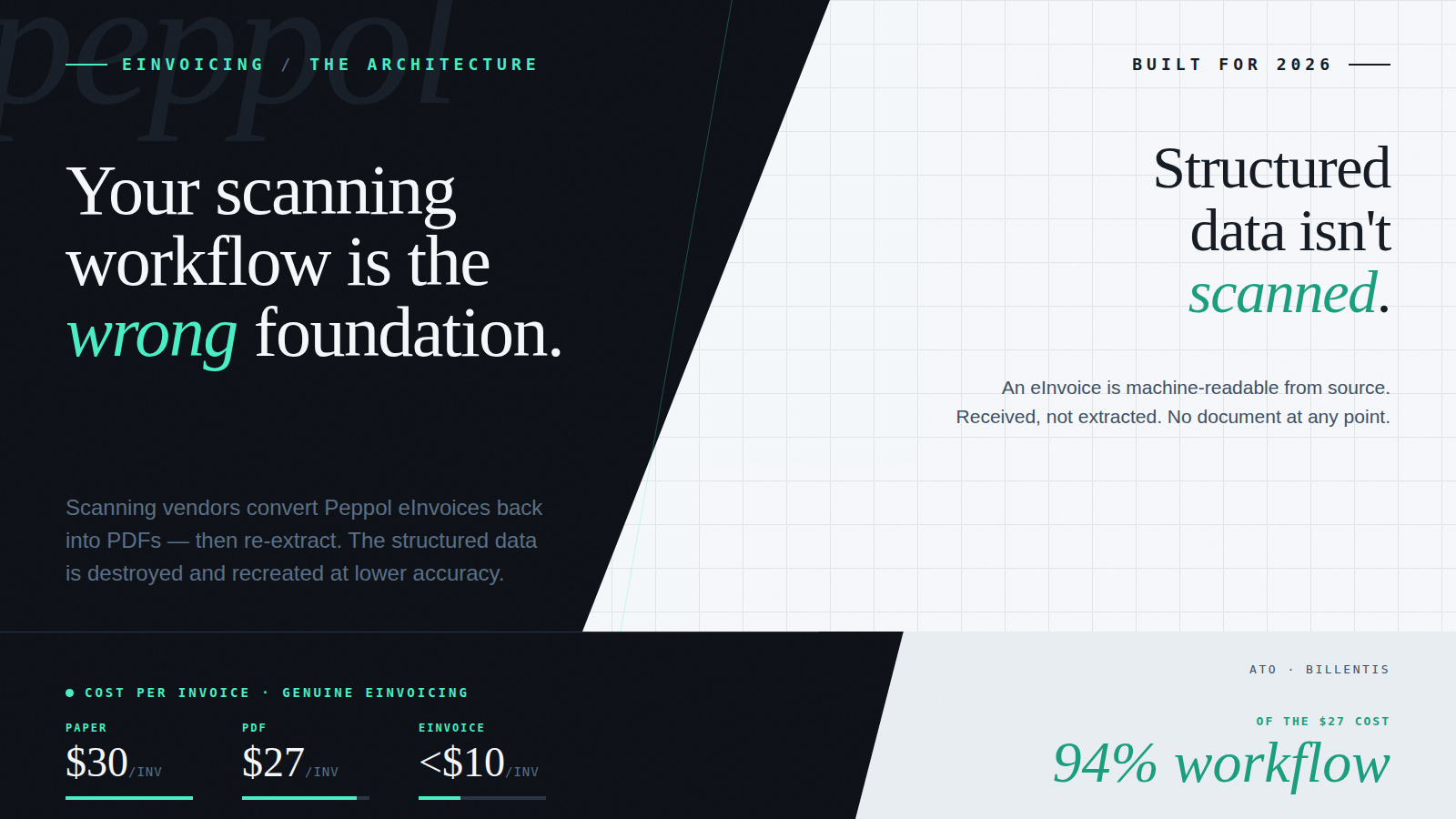
There is a question that ANZ finance teams with established AP automation are starting to ask more urgently as eInvoicing adoption grows: Does our current setup handle eInvoicing?
The honest answer, for most businesses running a scanning-based workflow, is no – even when the vendor says yes.
eInvoicing, in the Australian context, means exchanging structured invoice data directly between accounting systems via the Peppol network – with no PDF, no document, and no OCR extraction at any point. That definition is the reason most scanning-based AP workflows cannot handle it natively, regardless of what the vendor’s compliance checklist says.
The reason isn’t a missing feature or a configuration gap. It’s architectural. Scanning-based AP workflows are built around the PDF as the fundamental unit of work. Every component – the OCR engine, the data extraction layer, the approval workflow, and the ERP integration – was designed to process a document. eInvoicing sends structured data. There is no document. The architecture has no entry point for it.
Understanding why this matters and what the right architectural approach looks like is increasingly important for ANZ mid-market businesses on Xero or MYOB. The eInvoicing mandate is expanding. The 2026 compliance timeline is real. And the businesses that address this now, with the right foundation, will not need to revisit it again.
What eInvoicing Is – and Why It’s Different by Design
eInvoicing, in the Australian context, means exchanging structured invoice data between accounting systems via the Peppol network. There is no document. No PDF. No image to scan or text to extract.
When a Peppol-registered supplier sends an eInvoice, their accounting system generates a structured data payload – a standardised format called Peppol PINT A-NZ – and transmits it directly to the recipient’s accounting system via the Peppol network. The recipient’s system receives the invoice as structured fields: supplier ID, invoice number, date, line items, amounts, tax codes. Every field is machine-readable. None of it needs to be extracted from a document.
This is fundamentally different from receiving a PDF invoice, even a PDF generated automatically by accounting software and sent by email. A PDF is a presentation format: it’s designed to be read by humans. Extracting the data from it – whether manually or via OCR – is a workaround because the data was never structured for machine processing in the first place.
eInvoicing removes that workaround. The data that leaves the supplier’s system is the data that arrives in the recipient’s system, in the same structured form, with no extraction required. That is what makes it different by design, and it’s also what makes it incompatible with a workflow that was architected around documents.
The Architecture Problem: Why PDF-Centric Workflows Can’t Handle eInvoicing Natively
To understand why scanning workflows, struggle with eInvoicing, it helps to trace how a scanning-based AP stack actually works.
A typical scanning workflow runs like this: an invoice arrives, as a PDF attachment, a scanned image, or a printed document, and enters the OCR engine. The OCR engine reads the document, extracts the relevant fields, and outputs structured data to the workflow engine. The workflow engine then applies business rules: coding, matching, approval routing, and ERP export.
The critical observation is that the workflow engine sits downstream of extraction. It was designed to receive structured data generated by the OCR engine from a document. It expects a document to have come first. The whole system, the field mapping, the exception handling, the approval routing, the ERP integration -was built with that assumption baked in.
Now introduce a Peppol eInvoice into that stack. The eInvoice arrives as structured data, exactly what the workflow engine wants downstream. But the workflow engine can’t receive it directly, because there’s no document for the OCR engine to process. The scanning infrastructure has no entry point for structured data. It only has an entry point for documents.
So what happens? In most scanning-based implementations, the vendor’s solution is to convert the eInvoice into a PDF, feed the PDF through the OCR engine, extract the data back out, and pass it to the workflow engine as if it had just been scanned.
Consider what that process involves. The eInvoice arrives carrying perfect, validated, structured data, every field correct, every value machine-readable, no ambiguity. The vendor’s system then renders that data as a human-readable document. Then scans the document. Then re-extracts the data using OCR, introducing the same accuracy limitations, exception rates, and per-invoice costs that eInvoicing was supposed to eliminate.
The business has paid for Peppol compliance. It is receiving eInvoices. And the first thing the AP system does is destroy the structured data, recreate a document from it, and extract the data back out again, with lower accuracy than it started with.
This is not a fringe edge case. It is the standard response from scanning vendors who add “eInvoicing support” to an architecture that was never designed for it. The compliance box is ticked. The operational benefit is gone.
The ANZ Mandate and the Cost Case for Getting This Right
Australia’s eInvoicing mandate, built on the Peppol network, is expanding in stages. Federal government agencies are already required to receive Peppol eInvoices. Government suppliers are next in scope. The broader business community is following, with the ATO actively promoting adoption and further compliance stages expected.
The cost case reinforces the compliance case, but only when eInvoicing is implemented with native structured-data processing, not when it is retrofitted onto a PDF-centric workflow. The ATO benchmarks paper invoice processing at approximately $30 per invoice and PDF invoicing at approximately $27. Genuine eInvoicing, where structured Peppol data flows directly into the AP workflow without extraction, can reduce that cost to under $10 – but only when the AP workflow is also automated. The $27 benchmark is almost entirely workflow cost: Billentis research commissioned by the ATO breaks it down as approximately 94% workflow (coding, approval routing, matching, dispute resolution) and 6% capture. Automating the workflow is the primary cost lever. eInvoicing eliminates the capture step on top of that, compounding the savings. Both together deliver the sub-$10 cost. Either alone delivers less.
Implementing eInvoicing via PDF conversion does not deliver that saving. The extraction step still exists. The exceptions still exist. The per-invoice cost stays close to the PDF benchmark because the process is still fundamentally a PDF process with a Peppol-shaped front end.
For ANZ businesses evaluating their eInvoicing readiness, the question to ask their current vendor is not “Do you support eInvoicing?” The question is: “When you receive a Peppol eInvoice, does the structured data flow directly into the AP workflow, or does it get converted to a PDF first?” The answer tells you whether you’re buying genuine eInvoicing capability or a compliance label on a scanning workflow.
The Right Architecture: Native Structured Data Processing
Addressing this properly requires a workflow designed from the start to accept both documents and structured data as first-class inputs, not a document workflow with a conversion layer bolted on.
Acume is built on this model. The platform ingests both PDF invoices and Peppol eInvoices natively, routing both through the same AP workflow, but via different entry points that respect the nature of each format:
- PDF invoices enter through an AI-powered extraction layer. Rather than reading text positionally like traditional OCR, Acume’s extraction interprets document structure and financial context, handling varied layouts, line-item splits, credit notes, and foreign-currency invoices with higher accuracy than template-based capture.
- Peppol eInvoices are received directly from the Peppol network as structured data. They are validated against the Peppol PINT A-NZ standard and pass straight into the AP workflow as structured fields, no extraction, no conversion, no document created at any point.
From the point each invoice enters the workflow, the process is identical: auto-coding against the entity’s GL structure in Xero or MYOB, approval routing based on supplier, amount, and delegated authority, and ERP export on approval. The finance team sees the same interface, follows the same process, and gets the same audit trail, regardless of whether the invoice arrived as a PDF or a Peppol eInvoice.
Critically, Acume’s business rules, the logic governing how invoices are coded, matched, and routed, come configured out of the box, built on AP best practice. They operate on structured data fields, which means they work identically whether the source was a PDF or a Peppol eInvoice. There is no separate eInvoicing workflow, no separate configuration, no parallel process to maintain.
Becoming eInvoicing Ready Without Replacing What Works
For ANZ mid-market businesses on Xero or MYOB with a functioning PDF-based AP process, the transition to genuine eInvoicing capability does not require starting over. It requires replacing the extraction layer and workflow engine, not the accounting system, not the ERP integrations, not the supplier relationships.
In practice, the transition with Acume is incremental:
- Connect Acume to the existing accounting system. Suppliers, GL codes, and tax logic are pulled from Xero or MYOB directly. The chart of accounts stays mastered in the accounting system.
- Configure the AP workflow. Business rules come pre-configured on AP best practice and are adjusted for each entity’s approval thresholds, supplier settings, and structure.
- Continue processing PDFs through the AI extraction workflow. Existing suppliers keep invoicing by PDF. Processing continues without interruption.
- Enable Peppol eInvoice reception. As suppliers register on the Peppol network, their eInvoices begin arriving in Acume alongside PDFs. They automatically route through the same workflow; no separate process is required.
- Expand Peppol supplier onboarding over time. As the proportion of eInvoices grows, per-invoice processing cost falls. The workflow doesn’t change; the mix of input formats does.
The accounting system continues to receive approved invoice data in the same format as before. From the ERP’s perspective, nothing changes. From the AP team’s perspective, the workflow is the same. What changes is the quality and source of the data entering that workflow, and the compliance position ahead of the 2026 mandate.
Conclusion: The Foundation Matters
Scanning-based AP automation served a genuine purpose. It made invoice processing faster and more accurate than fully manual alternatives. But it was designed for a world where every invoice was a document, and its architecture reflects that assumption at every layer.
eInvoicing doesn’t fit that architecture. Not because it’s more advanced technology, but because it’s a different category of input. Structured data doesn’t need to be extracted; it needs to be received and processed. A workflow built to extract documents from images cannot do that natively. The conversion workaround that scanning vendors apply doesn’t solve the problem; it just hides the architectural mismatch behind a compliance label.
For ANZ businesses on Xero or MYOB evaluating their eInvoicing readiness ahead of 2026, the question isn’t whether your current system “supports” eInvoicing. It’s whether it processes eInvoices as structured data, or converts them to PDFs to fit a workflow that was built around documents. The answer determines whether you’re building a compliant, cost-efficient AP operation or paying for a compliance label on a process that hasn’t changed.
Ready to Handle eInvoicing the Right Way?
Acume works with ANZ mid-market businesses to build AP automation that handles both PDF invoices and Peppol eInvoices natively, without converting structured data into documents or replacing the Xero or MYOB setup that already works.
Contact us to talk through your eInvoicing readiness with our team.
Frequently Asked Questions
What is the difference between eInvoicing and PDF invoicing?
A PDF invoice is a document designed to be read by humans. Processing it requires either manual data entry or OCR to extract the relevant fields. An eInvoice via Peppol is structured, machine-readable data exchanged directly between accounting systems, no document is created at any point. The supplier’s system generates the data; the recipient’s system receives it as structured fields, ready for processing without extraction.
Why do scanning tools convert eInvoices to PDFs?
Scanning-based AP workflows are architecturally built around the document. The OCR engine, extraction layer, and workflow engine all assume that the input is a file that needs to be read and interpreted. When a Peppol eInvoice arrives as structured data, there is no document for the scanning infrastructure to process, so vendors convert it to a PDF first, feed it through the OCR engine, and re-extract the data. The structured data is destroyed and recreated at lower accuracy, eliminating the cost and quality benefits of eInvoicing.
What is the Peppol network and why does it matter for ANZ businesses?
Peppol is a global interoperability network for the electronic exchange of structured business documents. In Australia, it is the technical framework underpinning the eInvoicing mandate. Businesses and government agencies connect to the Peppol network via a Peppol access point, typically built into their AP platform or accounting system. For ANZ businesses, Peppol compliance is not optional for government suppliers, and B2B adoption is accelerating toward the 2026 compliance timeline.
How much can genuine eInvoicing reduce invoice processing costs?
The ATO benchmarks paper invoice processing at approximately $30 per invoice and PDF invoicing at approximately $27. Genuine eInvoicing, where structured Peppol data flows directly into the AP workflow without extraction, can reduce that cost to under $10 – when combined with AP workflow automation. The $27 benchmark is approximately 94% workflow cost and 6% capture cost (Billentis, Business Case E-Invoicing/E-Billing, 2017, commissioned by the ATO). Automating the workflow delivers the primary saving; eInvoicing eliminates the capture step on top of that. PDF conversion workflows reintroduce the extraction cost at the point of conversion and fail to deliver any saving.
Do I need to replace my existing accounting system to become eInvoicing ready?
No. The accounting system, Xero, MYOB, or another ERP, does not need to change. What needs to change is the AP workflow layer that sits between invoice receipt and ERP export. For businesses using Acume, Peppol eInvoice reception is an extension of the existing workflow: eInvoices arrive alongside PDFs, route through the same approval process, and export to the same accounting system in the same format.
How does eInvoicing work with Xero and MYOB?
Both Xero and MYOB support eInvoicing within their platforms. For businesses using Acume alongside Xero or MYOB, eInvoicing works through Acume’s Peppol-compliant ingestion layer: structured eInvoices arrive from the Peppol network, are validated and routed through the Acume approval workflow, and are exported to Xero or MYOB as approved invoice data in the standard format. The accounting system receives the same data it always has; the difference is that the source is now structured Peppol data rather than OCR-extracted text.
A demo on your actual workflow.
A live walkthrough using real data – the capture, the coding, the approval routing – and how it sits inside the AP workflow you already run. No slideware.